Welcome to AudioTexture.org
Be creative in all that you do.
Click the “Audio Texture App” link to the right to test it out!
Also, check us out at the ISEA2012 conference: http://www.stemarts.com/isea2012/curriculum/mohit-dubey
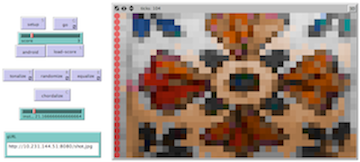
Basic Instructions And FAQ’s:
WHAT IS IT?
Audio Textures. Have you ever wanted to listen to anything around you? Now you can! Audio Textures uses computer programming to map visual aspects of hue and brightness to pitch and timbre of sound so you can create cool textures out of anything you see!
HOW IT WORKS
Basically, this app analyzes image and translates it to sound based on four components:
x (height) - Pitch y (length) - Duration hue (color) - Timbre/Instrument brightness - Velocity
By using these characteristics of the two arts, we can interpret the image as sound.
HOW TO USE IT
Before starting, be sure to set the speed (top slider with blue ball) to slower than the middle, that way it sounds better and the program doesn’t crash!
Then drag the red slider labeled “score” to any of the 11 choices*. Next hit “setup” or “load-score” to view the image. Once you find the one you want, it’s time to hear that sucker. Here’s where you have options:
By hitting “go” you can listen to the piece in a chromatic scale (very dense/atonal) “Tonalize” plays the piece in a major scale (still dense but tonal) “Randomize” plays random pitches but still uses hue-based instruments “Equalize” plays all the pitches as one cool chord (based off the golden ratio) You can also use “chordalize” to subtract out every other note of the scale used in either “go” or “tonalize” if it is too dense for your tastes.
*These are in order of how we interpreted the variables of sound/image. The first few deal with black and white images with some shading and the last couple deal with complex textures and real art pieces (don’t sue us Van Gogh).
THINGS TO NOTICE
The instruments change with different color patches! Also, notice how the dominant color of an image seems “subtracted out”? It is! To clean up image each one removes its most common color on a scale of the color variance within the image, it makes it sound better!
Try and listen for melodic lines where different colors occur in each texture.
Think about what you see and hear.
EXTENDING THE MODEL
The model is now moving in the direction of edge detection and cognitive science. Soon we will use the app to detect edges in images and incorporate that into the music translation portion. Also, soon the app will incorporate live motion, so it can understand change in an image through 3D polar coordinates! As far as cognitive science goes, we’re looking at adapting the app to guide blind people through rooms by describing the objects around them with sound! Stay tuned! Literally!
#audiotextures